
AI FOTO: 10 IDE EDIT FOTO DENGAN AI
Prompt Detail + Sample Before & After
Artikel siap upload: setiap ide memiliki bagian sendiri, prompt sendiri, dan sample Before → After sendiri. Gambar sample diambil dari visual contoh yang dibuat untuk artikel ini.
SEO Title
AI Foto: 10 Ide Edit Foto dengan AI + Prompt Detail Siap Pakai
Slug
ai-foto-10-ide-edit-foto-dengan-ai
Meta Description
10 ide AI Foto lengkap dengan sample Before dan After serta prompt detail untuk membuat foto cinematic, miniatur 3D, poster film, otomotif, keluarga, futuristik dan lainnya.
Tags
AI Foto, AI Image, Prompt AI, Edit Foto AI, AI Photography, Image Generation
1. Foto Cinematic Profesional
Sample Before → After — Foto Cinematic Profesional
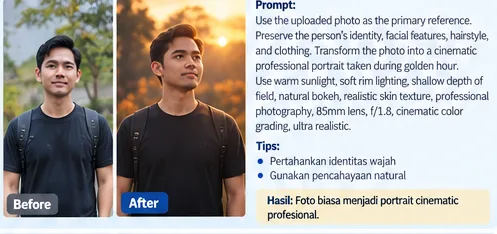
Sample 1: Before → After
Prompt Siap Pakai
Use the uploaded photo as the primary visual reference.
Transform the original photo into a highly realistic cinematic professional portrait.
Preserve the person’s original identity, facial structure, facial proportions, hairstyle, skin tone, body proportions, clothing design, and natural expression.
Place the subject in a sophisticated cinematic environment during golden hour. Use warm natural sunlight, soft rim lighting, realistic shadows, subtle atmospheric depth, natural bokeh and professional portrait composition.
Camera: full-frame professional camera, 85mm portrait lens, f/1.8 aperture, shallow depth of field, high dynamic range, cinematic color grading.
The final image should look like a real photograph taken by a professional photographer.
Tips
- Gunakan foto sumber dengan kualitas yang cukup baik.
- Jelaskan bagian yang harus dipertahankan, terutama wajah atau bentuk objek utama.
- Jika hasil belum sesuai, lakukan revisi dengan mengubah satu bagian prompt terlebih dahulu.
- Untuk hasil fotorealistik, gunakan kata seperti photorealistic, realistic lighting, natural texture, dan professional photography.
Caption & Alt Text
Caption: Contoh hasil AI Foto — Foto Cinematic Profesional, Before dan After.
Alt text: Contoh AI Foto 1, transformasi Foto Cinematic Profesional, before dan after.
2. Foto Menjadi Miniatur 3D
Sample Before → After — Foto Menjadi Miniatur 3D
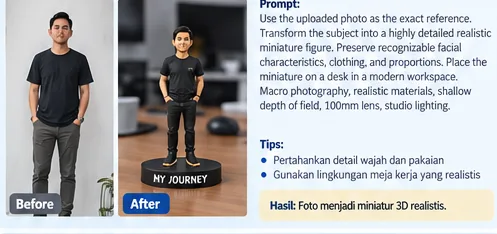
Sample 2: Before → After
Prompt Siap Pakai
Use the uploaded photo as the exact visual reference for the main subject.
Transform the main subject into a highly detailed realistic miniature collectible figure.
Preserve recognizable characteristics, shape, colors, clothing, proportions, and important details.
Place the miniature on a premium display base on a wooden desk in a modern creative workspace. Add realistic miniature materials, fine surface details, realistic shadows and a softly blurred background.
Use professional macro photography: 100mm macro lens, f/2.8, shallow depth of field, softbox lighting, realistic materials and photorealistic detail.
Tips
- Gunakan foto sumber dengan kualitas yang cukup baik.
- Jelaskan bagian yang harus dipertahankan, terutama wajah atau bentuk objek utama.
- Jika hasil belum sesuai, lakukan revisi dengan mengubah satu bagian prompt terlebih dahulu.
- Untuk hasil fotorealistik, gunakan kata seperti photorealistic, realistic lighting, natural texture, dan professional photography.
Caption & Alt Text
Caption: Contoh hasil AI Foto — Foto Menjadi Miniatur 3D, Before dan After.
Alt text: Contoh AI Foto 2, transformasi Foto Menjadi Miniatur 3D, before dan after.
3. Foto Menjadi Poster Film
Sample Before → After — Foto Menjadi Poster Film
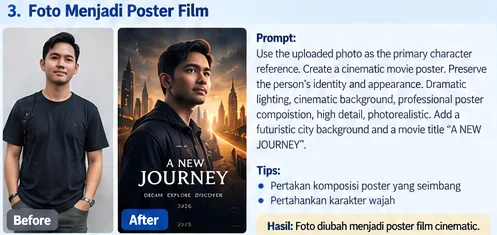
Sample 3: Before → After
Prompt Siap Pakai
Use the uploaded photo as the primary character reference.
Create a premium cinematic movie poster based on the original photo.
Preserve the character’s facial identity, hairstyle, clothing style and body proportions.
Place the character in a dramatic modern city at night with dramatic clouds, atmospheric fog and cinematic depth. Use strong cinematic key light, soft rim light, realistic shadows and professional poster composition.
Photorealistic environment, high production value, dramatic color grading, high dynamic range, vertical movie-poster format.
Tips
- Gunakan foto sumber dengan kualitas yang cukup baik.
- Jelaskan bagian yang harus dipertahankan, terutama wajah atau bentuk objek utama.
- Jika hasil belum sesuai, lakukan revisi dengan mengubah satu bagian prompt terlebih dahulu.
- Untuk hasil fotorealistik, gunakan kata seperti photorealistic, realistic lighting, natural texture, dan professional photography.
Caption & Alt Text
Caption: Contoh hasil AI Foto — Foto Menjadi Poster Film, Before dan After.
Alt text: Contoh AI Foto 3, transformasi Foto Menjadi Poster Film, before dan after.
4. Foto Mobil Menjadi Foto Otomotif Profesional
Sample Before → After — Foto Mobil Menjadi Foto Otomotif Profesional
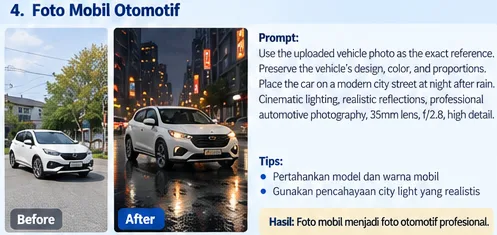
Sample 4: Before → After
Prompt Siap Pakai
Use the uploaded vehicle photo as the exact reference.
Preserve the vehicle’s make and model appearance, body proportions, headlights, taillights, wheels, windows, mirrors, grille, bumper, color and trim.
Place the vehicle on a modern city road at night shortly after rainfall. Make the road slightly wet with realistic reflections from street lights.
Use a low three-quarter front view, professional automotive photography, 35mm lens, f/2.8, cinematic street lighting, realistic reflections, realistic tires, glass and metal, high dynamic range.
Tips
- Gunakan foto sumber dengan kualitas yang cukup baik.
- Jelaskan bagian yang harus dipertahankan, terutama wajah atau bentuk objek utama.
- Jika hasil belum sesuai, lakukan revisi dengan mengubah satu bagian prompt terlebih dahulu.
- Untuk hasil fotorealistik, gunakan kata seperti photorealistic, realistic lighting, natural texture, dan professional photography.
Caption & Alt Text
Caption: Contoh hasil AI Foto — Foto Mobil Menjadi Foto Otomotif Profesional, Before dan After.
Alt text: Contoh AI Foto 4, transformasi Foto Mobil Menjadi Foto Otomotif Profesional, before dan after.
5. Foto Keluarga Cinematic
Sample Before → After — Foto Keluarga Cinematic
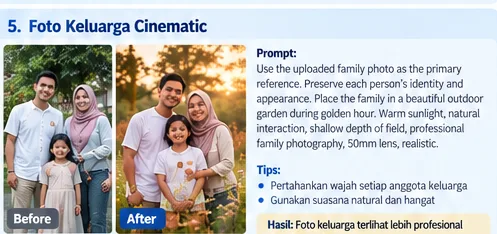
Sample 5: Before → After
Prompt Siap Pakai
Use the uploaded family photo as the primary reference.
Preserve every person’s identity, facial characteristics, hairstyle, skin tone, body proportions, age appearance, clothing style and natural relationship between the subjects.
Place the family in a beautiful outdoor garden during golden hour. Create a warm and natural family atmosphere with natural interaction.
Use warm sunlight, soft backlight, natural shadows, subtle lens flare, realistic grass, natural trees and soft background bokeh.
Professional family photography, full-frame camera, 50mm lens, f/2.0, photorealistic and natural skin texture.
Tips
- Gunakan foto sumber dengan kualitas yang cukup baik.
- Jelaskan bagian yang harus dipertahankan, terutama wajah atau bentuk objek utama.
- Jika hasil belum sesuai, lakukan revisi dengan mengubah satu bagian prompt terlebih dahulu.
- Untuk hasil fotorealistik, gunakan kata seperti photorealistic, realistic lighting, natural texture, dan professional photography.
Caption & Alt Text
Caption: Contoh hasil AI Foto — Foto Keluarga Cinematic, Before dan After.
Alt text: Contoh AI Foto 5, transformasi Foto Keluarga Cinematic, before dan after.
6. Foto Rumah Menjadi Foto Arsitektur Profesional
Sample Before → After — Foto Rumah Menjadi Foto Arsitektur Profesional
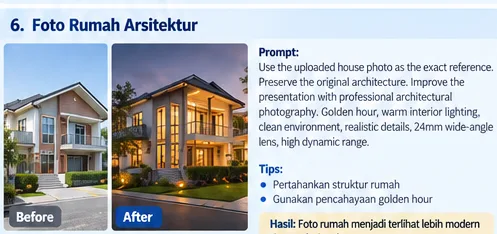
Sample 6: Before → After
Prompt Siap Pakai
Use the uploaded house photo as the exact architectural reference.
Preserve the original architecture: building shape, roof, windows, doors, walls, balcony, fence, driveway and overall proportions.
Do not redesign the building.
Improve the presentation through professional architectural photography. Create a late-afternoon golden-hour atmosphere with warm interior lights, a clean garden, realistic trees and pavement.
Use a professional full-frame architectural camera, 24mm wide-angle lens, straight vertical lines, natural perspective and high dynamic range.
Tips
- Gunakan foto sumber dengan kualitas yang cukup baik.
- Jelaskan bagian yang harus dipertahankan, terutama wajah atau bentuk objek utama.
- Jika hasil belum sesuai, lakukan revisi dengan mengubah satu bagian prompt terlebih dahulu.
- Untuk hasil fotorealistik, gunakan kata seperti photorealistic, realistic lighting, natural texture, dan professional photography.
Caption & Alt Text
Caption: Contoh hasil AI Foto — Foto Rumah Menjadi Foto Arsitektur Profesional, Before dan After.
Alt text: Contoh AI Foto 6, transformasi Foto Rumah Menjadi Foto Arsitektur Profesional, before dan after.
7. Foto Menjadi Karakter Futuristik
Sample Before → After — Foto Menjadi Karakter Futuristik
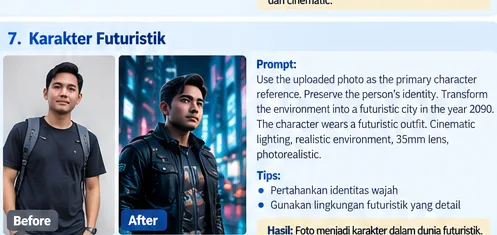
Sample 7: Before → After
Prompt Siap Pakai
Use the uploaded photo as the primary character reference.
Preserve the person’s facial identity and recognizable characteristics.
Transform the environment into a realistic futuristic city in the year 2090. Give the character a sophisticated futuristic outfit while keeping the face recognizable.
Add massive futuristic skyscrapers, advanced transportation, subtle holographic interfaces, modern streets, atmospheric fog and distant city lights.
Use blue and warm practical lights, soft rim lighting, cinematic reflections, 35mm cinematic lens and photorealistic science-fiction photography.
Tips
- Gunakan foto sumber dengan kualitas yang cukup baik.
- Jelaskan bagian yang harus dipertahankan, terutama wajah atau bentuk objek utama.
- Jika hasil belum sesuai, lakukan revisi dengan mengubah satu bagian prompt terlebih dahulu.
- Untuk hasil fotorealistik, gunakan kata seperti photorealistic, realistic lighting, natural texture, dan professional photography.
Caption & Alt Text
Caption: Contoh hasil AI Foto — Foto Menjadi Karakter Futuristik, Before dan After.
Alt text: Contoh AI Foto 7, transformasi Foto Menjadi Karakter Futuristik, before dan after.
8. Foto Bergaya Tahun 1980-an
Sample Before → After — Foto Bergaya Tahun 1980-an
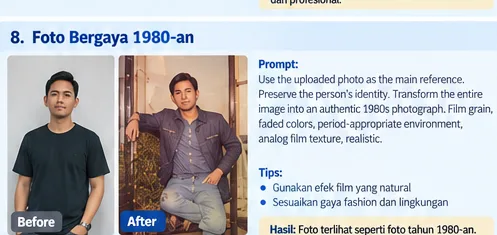
Sample 8: Before → After
Prompt Siap Pakai
Use the uploaded photo as the main reference.
Preserve the person’s identity and facial characteristics.
Transform the entire visual atmosphere into an authentic 1980s photograph. Use period-appropriate clothing, interior design, vehicles, architecture and lighting.
Add subtle film grain, slightly faded colors, natural film contrast, soft highlights and authentic analog photography texture.
Avoid excessive effects. The image should look like an authentic photograph captured using a film camera in the 1980s.
Tips
- Gunakan foto sumber dengan kualitas yang cukup baik.
- Jelaskan bagian yang harus dipertahankan, terutama wajah atau bentuk objek utama.
- Jika hasil belum sesuai, lakukan revisi dengan mengubah satu bagian prompt terlebih dahulu.
- Untuk hasil fotorealistik, gunakan kata seperti photorealistic, realistic lighting, natural texture, dan professional photography.
Caption & Alt Text
Caption: Contoh hasil AI Foto — Foto Bergaya Tahun 1980-an, Before dan After.
Alt text: Contoh AI Foto 8, transformasi Foto Bergaya Tahun 1980-an, before dan after.
9. Foto Menjadi Karakter 3D Animasi
Sample Before → After — Foto Menjadi Karakter 3D Animasi
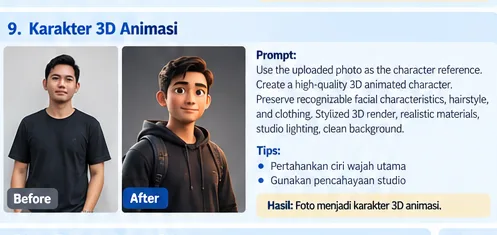
Sample 9: Before → After
Prompt Siap Pakai
Use the uploaded photo as the character reference.
Create a high-quality 3D animated character based on the person in the original photo.
Preserve recognizable facial characteristics, hairstyle, clothing colors and overall appearance.
Create a friendly stylized 3D character with realistic proportions and appealing facial expression.
Use high-quality 3D rendering, realistic skin shader, soft fabric materials, detailed hair, three-point studio lighting, clean background, 50mm lens and animation-quality rendering.
Tips
- Gunakan foto sumber dengan kualitas yang cukup baik.
- Jelaskan bagian yang harus dipertahankan, terutama wajah atau bentuk objek utama.
- Jika hasil belum sesuai, lakukan revisi dengan mengubah satu bagian prompt terlebih dahulu.
- Untuk hasil fotorealistik, gunakan kata seperti photorealistic, realistic lighting, natural texture, dan professional photography.
Caption & Alt Text
Caption: Contoh hasil AI Foto — Foto Menjadi Karakter 3D Animasi, Before dan After.
Alt text: Contoh AI Foto 9, transformasi Foto Menjadi Karakter 3D Animasi, before dan after.
10. Foto Menjadi Adegan Cinematic Siap Video
Sample Before → After — Foto Menjadi Adegan Cinematic Siap Video
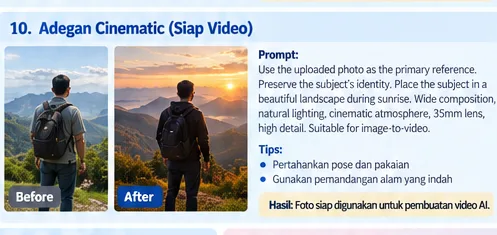
Sample 10: Before → After
Prompt Siap Pakai
Use the uploaded photo as the primary visual reference.
Preserve the subject’s identity, face, hairstyle, clothing and body proportions.
Place the subject in a beautiful cinematic outdoor landscape during sunrise. Add mountains in the distance, soft morning mist, grass moving gently in the wind and warm sunlight behind the subject.
Use wide cinematic composition, 35mm cinematic lens, natural atmospheric lighting, realistic shadows, high dynamic range and professional film color grading.
The image should look like a frame from a high-budget cinematic film and be suitable as a starting frame for image-to-video.
Tips
- Gunakan foto sumber dengan kualitas yang cukup baik.
- Jelaskan bagian yang harus dipertahankan, terutama wajah atau bentuk objek utama.
- Jika hasil belum sesuai, lakukan revisi dengan mengubah satu bagian prompt terlebih dahulu.
- Untuk hasil fotorealistik, gunakan kata seperti photorealistic, realistic lighting, natural texture, dan professional photography.
Caption & Alt Text
Caption: Contoh hasil AI Foto — Foto Menjadi Adegan Cinematic Siap Video, Before dan After.
Alt text: Contoh AI Foto 10, transformasi Foto Menjadi Adegan Cinematic Siap Video, before dan after.
Bonus: Dari Foto AI Menjadi Video
Setelah mendapatkan gambar After yang bagus, gambar tersebut dapat digunakan sebagai frame awal untuk image-to-video.
Animate the uploaded image naturally.
Keep the character’s identity, face, clothing and body proportions unchanged.
Create subtle natural movement: gentle body movement, natural blinking, slight hair movement caused by the wind, and soft environmental motion.
The camera slowly moves forward toward the subject.
Add subtle atmospheric movement in the background.
Keep the scene realistic and cinematic.
No sudden movement. No face distortion. No body deformation. No additional people appearing.
Kesimpulan
AI foto memungkinkan satu foto dikembangkan menjadi banyak konsep visual. Kunci hasil yang konsisten adalah menggunakan foto referensi yang jelas, menjelaskan bagian yang harus dipertahankan, dan memberikan prompt yang spesifik mengenai suasana, pencahayaan, komposisi, kamera, serta gaya visual.
Alur sederhananya: Foto Asli → Prompt AI → Sample After → Image-to-Video → Konten.